Kết nối MongoDB và xây dựng CRUD API
Trong bài trước, chúng ta đã xây dựng API với Express. Bài này bổ sung mảnh ghép quan trọng của ứng dụng thực tế: lưu dữ liệu lâu dài trong MongoDB. Bạn sẽ kết nối Node.js với MongoDB, thao tác CRUD và hoàn thiện API quản lý sách có thể kiểm thử bằng curl hoặc Postman.
Mục lục
1. Mục tiêu bài học
- Hiểu vai trò của driver khi Node.js giao tiếp với cơ sở dữ liệu.
- Kết nối bằng MongoDB Node.js Driver chính thức.
- Dùng insertOne, find, findOne, updateOne và deleteOne.
- Xử lý ObjectId, mã trạng thái HTTP và lỗi đầu vào.
- Xây dựng REST API CRUD bằng Express và MongoDB.
2. Node.js làm việc với cơ sở dữ liệu như thế nào?
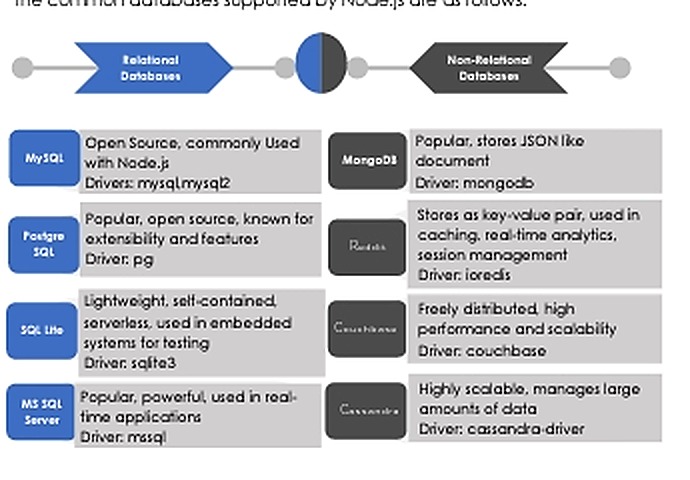
Một driver đứng giữa ứng dụng và máy chủ cơ sở dữ liệu, chuyển lời gọi JavaScript thành giao thức MongoDB, quản lý kết nối và chuyển kết quả trở lại cho Node.js. Node.js hỗ trợ cả cơ sở dữ liệu quan hệ như MySQL, PostgreSQL, SQL Server và phi quan hệ như MongoDB, Redis hoặc Cassandra. MongoDB phù hợp với JavaScript vì dữ liệu document rất gần với object.
3. Chuẩn bị MongoDB và dự án
Bạn có thể dùng MongoDB Community trên máy hoặc MongoDB Atlas. Với môi trường cục bộ, URI thường là mongodb://127.0.0.1:27017. Không đưa mật khẩu hoặc connection string thật lên Git.
mkdir node-mongodb-api
cd node-mongodb-api
npm init -y
npm install express mongodb dotenv
# .env
MONGODB_URI=mongodb://127.0.0.1:27017
PORT=3000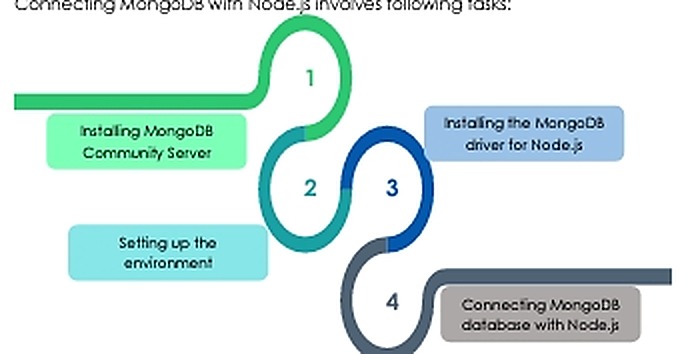
4. Tạo kết nối dùng chung
Mỗi tiến trình nên tạo một MongoClient rồi tái sử dụng. Driver đã có connection pool; tạo client mới trong từng request vừa chậm vừa làm tăng số kết nối.
// db.js
const { MongoClient } = require('mongodb');
const uri = process.env.MONGODB_URI ?? 'mongodb://127.0.0.1:27017';
const client = new MongoClient(uri);
let database;

async function connectDatabase() {
  await client.connect();
  database = client.db('library');
  await database.command({ ping: 1 });
  console.log('Đã kết nối MongoDB');
}
function getDatabase() {
  if (!database) throw new Error('MongoDB chưa được kết nối');
  return database;
}
module.exports = { client, connectDatabase, getDatabase };
5. CRUD trong MongoDB
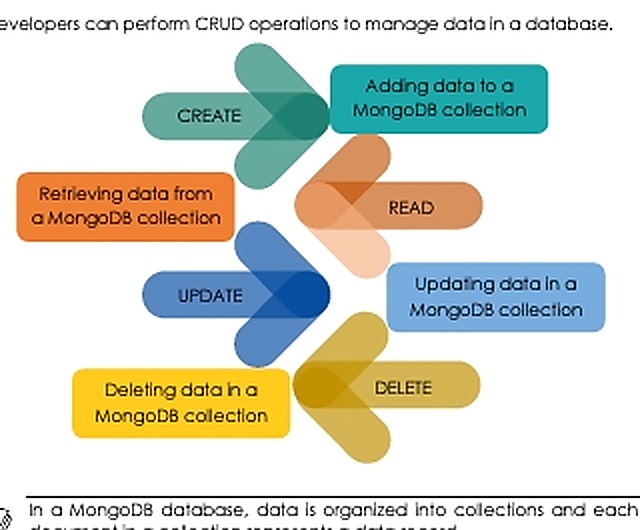
Dữ liệu MongoDB được tổ chức thành database, collection và document. Ví dụ dùng database library, collection books. Mỗi document mặc định có trường _id kiểu ObjectId.
6. Create và Read
const books = db.collection('books');

const result = await books.insertOne({
  name: 'Node.js thực chiến',
  author: 'Học Viết Code',
  price: 180000,
  createdAt: new Date()
});
console.log(result.insertedId);

const allBooks = await books
  .find({})
  .sort({ createdAt: -1 })
  .limit(20)
  .toArray();
find() trả về cursor, vì vậy cần gọi toArray() để nhận mảng kết quả. Khi chỉ cần một document, dùng findOne().
7. ObjectId, Update và Delete
req.params.id là chuỗi, còn _id mặc định là ObjectId. Luôn kiểm tra định dạng trước khi chuyển đổi để API có thể trả lỗi 400 rõ ràng.
const { ObjectId } = require('mongodb');

if (!ObjectId.isValid(id)) {
  throw new Error('ID không hợp lệ');
}
const _id = new ObjectId(id);

await books.updateOne(
  { _id },
  { $set: { price: 210000, updatedAt: new Date() } }
);

await books.deleteOne({ _id });
Với cập nhật, kiểm tra matchedCount; với xóa, kiểm tra deletedCount. Nếu bằng 0, API nên trả 404.
8. Xây dựng REST API Express
require('dotenv').config();
const express = require('express');
const { ObjectId } = require('mongodb');
const { connectDatabase, getDatabase } = require('./db');

const app = express();
app.use(express.json());
const books = () => getDatabase().collection('books');

app.get('/books', async (req, res, next) => {
  try {
    res.json(await books().find({}).limit(100).toArray());
  } catch (error) { next(error); }
});

app.get('/books/:id', async (req, res, next) => {
  try {
    if (!ObjectId.isValid(req.params.id)) {
      return res.status(400).json({ message: 'ID không hợp lệ' });
    }
    const book = await books().findOne({
      _id: new ObjectId(req.params.id)
    });
    if (!book) return res.status(404).json({ message: 'Không tìm thấy sách' });
    res.json(book);
  } catch (error) { next(error); }
});
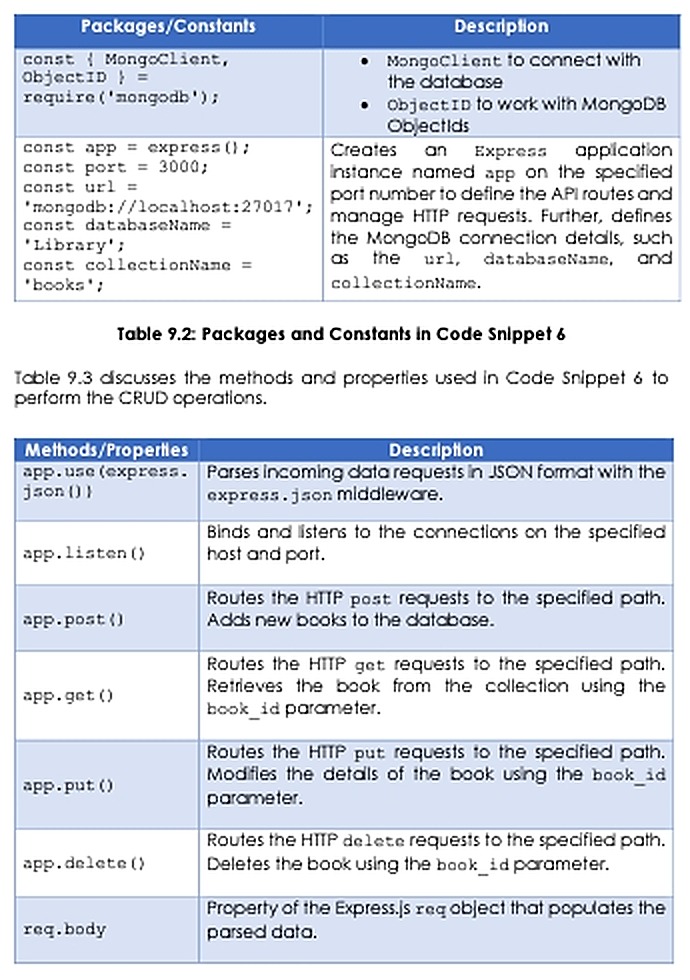
9. API tạo, sửa và xóa
app.post('/books', async (req, res, next) => {
  try {
    const { name, author, price } = req.body;
    if (!name || !author || !Number.isFinite(price)) {
      return res.status(400).json({ message: 'Dữ liệu không hợp lệ' });
    }
    const book = { name, author, price, createdAt: new Date() };
    const result = await books().insertOne(book);
    res.status(201).json({ ...book, _id: result.insertedId });
  } catch (error) { next(error); }
});

app.put('/books/:id', async (req, res, next) => {
  try {
    if (!ObjectId.isValid(req.params.id)) return res.status(400).json({ message: 'ID không hợp lệ' });
    const result = await books().updateOne(
      { _id: new ObjectId(req.params.id) },
      { $set: { ...req.body, updatedAt: new Date() } }
    );
    if (!result.matchedCount) return res.status(404).json({ message: 'Không tìm thấy sách' });
    res.json({ message: 'Cập nhật thành công' });
  } catch (error) { next(error); }
});

app.delete('/books/:id', async (req, res, next) => {
  try {
    if (!ObjectId.isValid(req.params.id)) return res.status(400).json({ message: 'ID không hợp lệ' });
    const result = await books().deleteOne({ _id: new ObjectId(req.params.id) });
    if (!result.deletedCount) return res.status(404).json({ message: 'Không tìm thấy sách' });
    res.status(204).end();
  } catch (error) { next(error); }
});
10. Khởi động và xử lý lỗi tập trung
app.use((error, req, res, next) => {
  console.error(error);
  res.status(500).json({ message: 'Lỗi máy chủ' });
});

async function start() {
  await connectDatabase();
  app.listen(process.env.PORT ?? 3000, () => {
    console.log('API chạy tại http://localhost:3000');
  });
}
start().catch(console.error);
Ứng dụng chỉ lắng nghe sau khi kết nối cơ sở dữ liệu thành công. Khi tiến trình dừng, hãy gọi client.close() để giải phóng tài nguyên.
11. Kiểm thử API bằng curl
curl http://localhost:3000/books

curl -X POST http://localhost:3000/books \
  -H "Content-Type: application/json" \
  -d '{"name":"Node.js căn bản","author":"An","price":150000}'

curl -X DELETE http://localhost:3000/books/BOOK_ID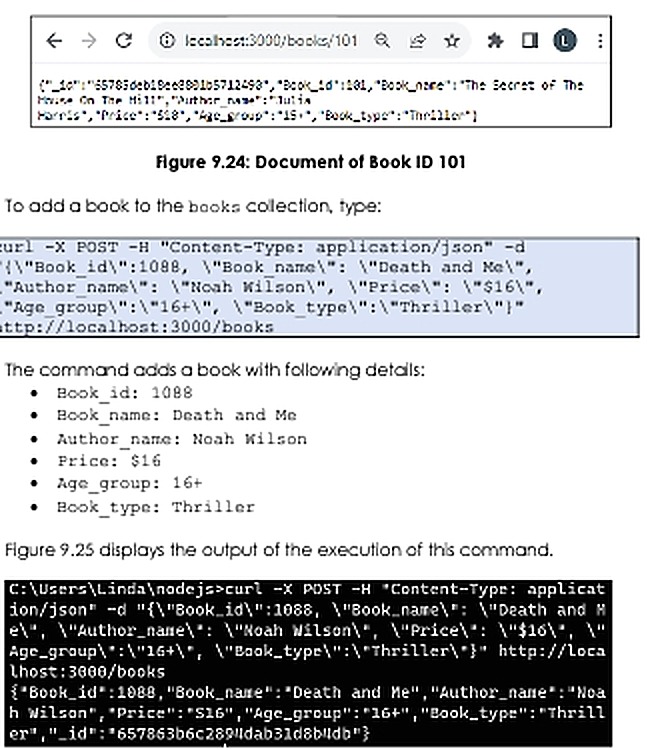
12. Lỗi thường gặp
- ECONNREFUSED: MongoDB chưa chạy hoặc URI sai.
- Authentication failed: sai tài khoản, mật khẩu hoặc authentication database.
- Không tìm thấy document: quên chuyển chuỗi ID thành ObjectId.
- req.body là undefined: thiếu
app.use(express.json()). - Quá nhiều kết nối: tạo MongoClient trong từng request.
- API chậm: thiếu index, phân trang hoặc giới hạn bản ghi.
13. Bài tập thực hành
- Thêm trường category và endpoint lọc sách theo thể loại.
- Thêm phân trang bằng page, limit, skip() và limit().
- Tạo unique index cho ISBN và xử lý lỗi trùng dữ liệu.
- Viết middleware kiểm tra dữ liệu đầu vào.
- Tách router, controller và repository thành các module riêng.
Tổng kết
Bạn đã đi từ kết nối MongoDB đến REST API CRUD hoàn chỉnh. Hãy giữ connection string trong biến môi trường, tái sử dụng một MongoClient cho mỗi tiến trình và luôn kiểm tra dữ liệu đầu vào cùng ObjectId. Đây là nền tảng để xây dựng ứng dụng Node.js có xác thực, phân trang và triển khai thực tế.
Bài tập 1:
Chủ đề: Xây dựng hệ thống quản lý tài khoản Library Kiosk (Thư viện tự phục vụ)
Tổng điểm: 20 điểm Công nghệ sử dụng: Node.js, Express.js, MongoDB, bcrypt Hình thức: Thực hành lập trình
Phần 1: Kết nối và khởi tạo cơ sở dữ liệu (4 điểm)
Viết một file JavaScript (ví dụ: db.js) có thể được sử dụng trong các file khác thông qua require() hoặc import.
Yêu cầu:
- (1 điểm) Kết nối đến MongoDB bằng thư viện
mongoosevà xuất kết nối hoặc model để các file khác có thể sử dụng. - (1 điểm) Sử dụng cơ sở dữ liệu có tên
library_kiosk. Nếu cơ sở dữ liệu chưa tồn tại, chương trình phải tạo cơ sở dữ liệu khi khởi tạo dữ liệu. - (1 điểm) Định nghĩa Schema và Model cho collection
kiosk_accountsvới các trường sau:
| Tên trường | Kiểu dữ liệu | Ràng buộc |
|---|---|---|
username | String | Required, Unique, Maxlength: 100 |
pin_hash | String | Required |
student_id | String | Required, Maxlength: 12 |
– (1 điểm) Nếu xảy ra lỗi trong quá trình kết nối hoặc thực hiện thao tác với MongoDB, chương trình phải hiển thị thông báo lỗi và xử lý hoặc dừng thao tác phù hợp.
Lưu ý: Trường pin_hash lưu mã PIN đã được băm bằng bcrypt. Không lưu PIN dạng văn bản thuần. Cần tạo unique index cho username để bảo đảm tính duy nhất.
Phần 2: Xây dựng chức năng đăng ký tài khoản (4 điểm)
Viết chức năng đăng ký tài khoản bằng Express.js (ví dụ: register.js).
Yêu cầu:
- (1 điểm) Xây dựng route
GET /registerhiển thị biểu mẫu đăng ký gồm 3 trường:username: Tên đăng nhậppin: Mã PINstudent_id: Mã sinh viên
POSTgửi dữ liệu đến/register. - (1 điểm) Khi nhận dữ liệu đăng ký, sử dụng Mongoose để kiểm tra
usernameđã tồn tại trong collectionkiosk_accountshay chưa. Nếu tồn tại, hiển thị thông báo “Tên đăng nhập đã tồn tại” và hiển thị lại biểu mẫu trống. - (2 điểm) Nếu tên đăng nhập chưa tồn tại:
- Sử dụng
bcrypt.hash()với salt rounds bằng10để băm mã PIN. - Thêm tài khoản mới vào collection
kiosk_accounts. - Hiển thị thông báo “Đăng ký tài khoản thành công”, kèm theo
usernamevàstudent_idvừa đăng ký.
- Sử dụng
Phần 3: Xây dựng chức năng đăng nhập (4 điểm)
Viết chức năng đăng nhập bằng Express.js (ví dụ: login.js).
Yêu cầu:
- (1 điểm) Xây dựng route
GET /loginhiển thị biểu mẫu đăng nhập gồm:username: Tên đăng nhậppin: Mã PIN
- (1 điểm) Khi người dùng gửi biểu mẫu bằng phương thức
POSTđến/login:- Sử dụng Mongoose để tìm tài khoản theo
username. - Sử dụng
bcrypt.compare()để kiểm tra mã PIN nhập vào vớipin_hashđã lưu trong MongoDB. - Nếu chính xác, hiển thị thông báo:
USERNAMEđược thay bằng tên đăng nhập thực tế. - Sử dụng Mongoose để tìm tài khoản theo
- (2 điểm) Nếu tên đăng nhập không tồn tại hoặc PIN không chính xác:
- Hiển thị thông báo “Tên đăng nhập hoặc mã PIN không chính xác”.
- Hiển thị lại biểu mẫu đăng nhập để người dùng nhập lại.
Phần 4: Xây dựng chức năng đặt lại mã PIN (4 điểm)
Viết chức năng đặt lại mã PIN bằng Express.js (ví dụ: reset_pin.js).
Yêu cầu:
- (1 điểm) Xây dựng route
GET /reset-pinhiển thị biểu mẫu gồm:username: Tên đăng nhậpstudent_id: Mã sinh viên
- (2 điểm) Khi người dùng gửi biểu mẫu bằng phương thức
POSTđến/reset-pin:- Sử dụng Mongoose để tìm tài khoản có
usernamevàstudent_idtương ứng trong MongoDB. - Nếu thông tin chính xác:
- Sử dụng module
cryptocủa Node.js để tạo ngẫu nhiên một mã PIN mới gồm 8 ký tự chữ và số. - Băm mã PIN mới bằng
bcryptvới salt rounds bằng10. - Sử dụng phương thức cập nhật của Mongoose để thay đổi
pin_hashtrong collectionkiosk_accounts. - Hiển thị thông báo “Đặt lại mã PIN thành công” và mã PIN vừa tạo cho người dùng.
- Sử dụng module
- Sử dụng Mongoose để tìm tài khoản có
- (1 điểm) Nếu thông tin
usernamehoặcstudent_idkhông chính xác:- Hiển thị thông báo “Không tìm thấy tài khoản phù hợp”.
- Hiển thị lại biểu mẫu đặt lại PIN bên dưới thông báo.
Phần 5: Xây dựng chức năng thay đổi mã PIN (4 điểm)
Viết chức năng thay đổi mã PIN bằng Express.js (ví dụ: change_pin.js).
Yêu cầu:
- (1 điểm) Xây dựng route
GET /change-pinhiển thị biểu mẫu gồm:username: Tên đăng nhậpcurrent_pin: Mã PIN hiện tạinew_pin: Mã PIN mới
- (2 điểm) Khi người dùng gửi biểu mẫu bằng phương thức
POSTđến/change-pin:- Sử dụng Mongoose để tìm tài khoản theo
username. - Sử dụng
bcrypt.compare()để xác minhcurrent_pinvớipin_hashtrong MongoDB. - Nếu thông tin chính xác:
- Băm
new_pinbằngbcryptvới salt rounds bằng10. - Cập nhật trường
pin_hashcủa tài khoản trong MongoDB. - Hiển thị thông báo “Thay đổi mã PIN thành công”.
- Băm
- Sử dụng Mongoose để tìm tài khoản theo
- (1 điểm) Nếu tên đăng nhập không tồn tại hoặc mã PIN hiện tại không chính xác:
- Không thực hiện cập nhật dữ liệu.
- Hiển thị thông báo “Thay đổi mã PIN thất bại”.
- Hiển thị lại biểu mẫu để người dùng nhập lại thông tin.
Bài viết liên quan:

Dịch vụ thiết kế Wesbite