
Database Command trong MongoDB
Trong session này, chúng ta sẽ thảo luận một số vấn đề:
- Giải thích tầm quan trọng của database commands trong MongoDB
- Mô tả các loại database commands khác nhau kèm ví dụ
Các lệnh database chủ yếu liên quan đến:
- tạo và chỉnh sửa dữ liệu của user và collection
- xác thực người dùng
- nhóm nhiều document
Các truy vấn sử dụng database commands thường khá phức tạp.
Session này sẽ:
- giải thích các loại database commands
- mô tả các tham số của từng command
- hướng dẫn cách sử dụng với ví dụ
Mục lục
5.1 Introduction to Database Commands
Các developer sử dụng MongoDB database commands để:
- tạo database
- chỉnh sửa database
- cập nhật database
Một số nhóm lệnh database trong MongoDB gồm:
MongoDB Database Commands
User Management
- createUser
- grantRolesToUser
- usersInfo
- dropUser
Authentication
- auth
- getnonce
Write Operation
- insert
- find
- findAndModify
- update
- delete
Aggregation
- count
- aggregate
- distinct
Trước khi tìm hiểu các nhóm lệnh này, ta cần hiểu cách chạy một command.
Cú pháp:
db.runCommand({ <command> })
Ở đây:
- người dùng cung cấp command cần thực thi
- command có thể ở dạng document hoặc string
Mặc dù db.runCommand chạy command trên database hiện tại, một số command chỉ áp dụng cho admin database.
Do đó người dùng phải:
- chuyển sang database admin
- hoặc dùng
db.adminCommand
Cú pháp:
db.adminCommand({ <command> })
Lệnh runCommand cung cấp một helper để chạy các database command.
Phương thức này tạo ra giao diện thống nhất giữa MongoDB shell và driver, vì vậy đây là cách được ưu tiên sử dụng để gọi database command.
Các lệnh db.runCommand và db.adminCommand nhận database command làm tham số, có thể là:
- document
- string
Nếu command được truyền dưới dạng string, MongoDB sẽ tự động chuyển thành document.
5.2 User Management Commands
Các lệnh quản lý người dùng trong MongoDB cho phép thực hiện các thao tác như:
- tạo user
- xóa user
- xem thông tin user
- gán role cho user
MongoDB Database Commands
| Command | Chức năng |
|---|---|
| createUser | Tạo user |
| grantRolesToUser | Gán role cho user |
| usersInfo | Xem thông tin user |
| dropUser | Xóa user |
5.2.1 createUser Command
Người dùng có thể sử dụng lệnh createUser để tạo user mới trong database đang hoạt động.
Nếu user đã tồn tại, MongoDB sẽ trả về lỗi duplicate user.
Cú pháp
db.runCommand({
 createUser: "<name>",
 pwd: passwordPrompt()   // hoặc "<cleartext password>",
 customData: { <any information> },
 roles: [
  { role: "<role>", db: "<database>" } | "<role>"
 ],
 writeConcern: { <write concern> },
 authenticationRestrictions: [
  {
   clientSource: ["<IP|CIDR range>", ...],
   serverAddress: ["<IP|CIDR range>", ...]
  }
 ],
 mechanisms: ["<scram-mechanism>", ...],
 digestPassword: <boolean>,
 comment: <any>
})
Bảng 5.1: Các tham số của createUser
| Parameter | Type | Description |
|---|---|---|
| createUser | string | Tên user mới |
| pwd | string | Password của user |
| customData | document | Thông tin bổ sung cho user |
| roles | array | Role được gán cho user |
| digestPassword | boolean | Xác định password được digest ở client hay server |
| writeConcern | document | Mức độ write concern cho thao tác tạo user |
| authenticationRestrictions | array | Danh sách IP được phép đăng nhập |
| mechanism | array | Cơ chế xác thực SCRAM |
Ví dụ
Tạo user User_1 trong database sample_training với role readWrite.
use sample_training

db.runCommand({
 createUser: "User_1",
 pwd: passwordPrompt(),
 roles: ["readWrite"]
})
Hệ thống sẽ yêu cầu nhập password.
Ví dụ:
Enter password
********
{ ok: 1 }
Tạo user thứ hai
db.runCommand({
 createUser: "User_2",
 pwd: passwordPrompt(),
 roles: ["readWrite"]
})
Kết quả:
Enter password
********
{ ok: 1 }
5.2.2 grantRolesToUser Command
Lệnh grantRolesToUser dùng để gán thêm role cho user.
Cú pháp
db.runCommand({
 grantRolesToUser: "<user>",
 roles: [ <roles> ],
 writeConcern: { <write concern> },
 comment: <any>
})
Gán role cho user
Khi gán role cho user trong database hiện tại:
- chỉ cần ghi tên role
Ví dụ:
readWrite
Hoặc có thể chỉ định role dạng document:
{ role: "<role>", db: "<database>" }
Nếu role thuộc database khác, bắt buộc phải dùng dạng document.
Ví dụ
Database sample_supplies
Gán role read của database sample_supplies cho User_1 trong database sample_training.
db.runCommand({
 grantRolesToUser: "User_1",
 roles: [
  { role: "read", db: "sample_supplies" },
  "readWrite"
 ]
})
Dưới đây là bản dịch đầy đủ phần tiếp theo của Session 5 theo đúng nội dung trong ảnh bạn gửi.
Hình 5.3: Chỉ định thêm quyền read cho User_1
Một quyền read bổ sung trong một database khác đã được gán cho User_1.
5.2.3 Lệnh usersInfo
Lệnh usersInfo trả về thông tin của một hoặc nhiều người dùng trong database.
Cú pháp
db.runCommand({
   usersInfo: <various>,
   showCredentials: <Boolean>,
   showCustomData: <Boolean>,
   showPrivileges: <Boolean>,
   showAuthenticationRestrictions: <Boolean>,
   filter: <document>,
   comment: <any>
})
Bảng 5.2: Các dạng của lệnh usersInfo
| Form | Description |
|---|---|
{ usersInfo: 1 } | Trả về thông tin của tất cả người dùng trong database hiện tại |
{ usersInfo: <username> } | Trả về thông tin của một user cụ thể |
{ usersInfo: { user: <name>, db: <db> } } | Trả về thông tin user trong database được chỉ định |
{ usersInfo: [ { user: <name>, db: <db> }, ... ] } | Trả về thông tin nhiều user |
{ forAllDBs: true } | Trả về thông tin user trong tất cả database |
Ví dụ
Xem thông tin của User_1 trong database sample_training
db.runCommand({
  usersInfo: { user: "User_1", db: "sample_training" },
  showPrivileges: true
})
Hình 5.4: Thông tin của User_1 trong database sample_training
Kết quả hiển thị:
- user id
- username
- database
- authentication mechanisms
- roles
- inherited roles
- privileges
5.2.4 Lệnh dropUser
Lệnh dropUser dùng để xóa một user khỏi database hiện tại.
Cú pháp
db.runCommand({
   dropUser: "<user>",
   writeConcern: { <write concern> },
   comment: <any>
})
Ví dụ
Xóa User_2 khỏi database sample_training
db.runCommand({ dropUser: "User_2" })
Hình 5.5: Xóa User_2 khỏi database sample_training
Kết quả:
{ ok: 1 }
Điều này cho biết user đã được xóa thành công.
5.3 Authentication Commands
Authentication là quá trình xác thực thông tin đăng nhập của người dùng dựa trên các giá trị được lưu trữ.
MongoDB cung cấp bảo mật thông qua các lệnh authentication sau:
MongoDB Authentication Commands
| Command | Description |
|---|---|
| auth | Bắt đầu phiên xác thực bằng username và password |
| getnonce | Tạo mật khẩu dùng một lần (internal command) |
Session này chỉ giải thích auth command, vì getnonce là lệnh nội bộ của MongoDB.
5.3.1 Lệnh Authenticate (db.auth)
Lệnh db.auth xác thực người dùng bằng cơ chế x.509 authentication.
Lệnh này trả về:
- 0 nếu xác thực thất bại
- 1 nếu xác thực thành công
Cú pháp
db.auth({
   user: <username>,
   pwd: passwordPrompt(),  // hoặc "cleartext password"
   mechanism: <authentication mechanism>,
   digestPassword: <boolean>
})
Bảng 5.3: Tham số của lệnh db.auth
| Parameter | Type | Optional/Mandatory | Description |
|---|---|---|---|
| user | string | Mandatory | Tên người dùng |
| pwd | string | Mandatory | Mật khẩu của user |
| mechanism | string | Optional | Cơ chế authentication |
| digestPassword | boolean | Optional | Xác định có hash password trước khi xác thực hay không |
Nhập mật khẩu khi xác thực
Có 2 cách nhập password
Cách 1
Không nhập password trực tiếp:
db.auth(<username>)
hoặc
db.auth(<username>, passwordPrompt())
MongoDB sẽ yêu cầu nhập password từ bàn phím.
Cách 2
Nhập password trực tiếp:
db.auth(<username>, <password>)
⚠️ Lưu ý
MongoDB chỉ có thể xác thực user sau khi kết nối shell được thiết lập.
Ví dụ
Xác thực user User_1 với password user1 trong database sample_training
db.auth("User_1", "user1")Kết quả:
{ ok: 1 }
Điều này cho thấy xác thực thành công.
Dưới đây là bản dịch tiếp theo phần 5.4 Write Operation Commands theo đúng nội dung các trang bạn gửi.
5.4 Write Operation Commands
Write operation là thao tác dùng để tạo hoặc chỉnh sửa dữ liệu trong MongoDB.
Trong MongoDB:
- write operations hoạt động trên một collection
- có thể ảnh hưởng đến một hoặc nhiều document trong collection đó.
Các command MongoDB cung cấp cho write operations gồm:
MongoDB Database Commands – Write Operation
| Command | Chức năng |
|---|---|
| insert | Chèn một hoặc nhiều document |
| find | Lấy document từ collection |
| findAndModify | Lấy và chỉnh sửa một document |
| update | Cập nhật một hoặc nhiều document |
| delete | Xóa một hoặc nhiều document |
5.4.1 Insert Command
Lệnh insert dùng để chèn một hoặc nhiều document vào collection.
Lệnh này trả về một document chứa trạng thái của tất cả các thao tác insert.
Cú pháp
db.runCommand({
   insert: <collection>,
   documents: [ <document>, <document>, ... ],
   ordered: <boolean>,
   writeConcern: { <write concern> },
   bypassDocumentValidation: <boolean>,
   comment: <any>
})
| Parameter | Type | Description |
|---|---|---|
| insert | string | Tên collection |
| documents | array | Danh sách document cần insert |
| ordered | boolean | Nếu true, khi một insert lỗi thì các insert còn lại không chạy. Nếu false thì các insert còn lại vẫn tiếp tục |
| writeConcern | document | Mức độ đảm bảo ghi dữ liệu |
| bypassDocumentValidation | boolean | Cho phép insert document không thỏa validation rule |
| comment | any | Chuỗi mô tả để tracking operation trong profiler hoặc logs |
Ví dụ
Trong database sample_analytics, collection accounts.
Insert một document:
- account_id = 988877
- limit = 2000
- products = InvestmentFund
db.runCommand({
 insert: "accounts",
 documents: [
   {
     account_id: 988877,
     limit: 2000,
     products: ["InvestmentFund"]
   }
 ]
})
Kết quả
{ n: 1, ok: 1 }
Điều này cho biết 1 document đã được insert thành công.
Kiểm tra document vừa insert
db.accounts.find({ "account_id": 988877 })
Kết quả
{
 _id: ObjectId(...),
 account_id: 988877,
 limit: 2000,
 products: ["InvestmentFund"]
}
5.4.2 Find Command
Lệnh find dùng để:
- chọn các document
- thỏa điều kiện query
- từ một collection
Kết quả trả về là cursor.
Cursor là gì?
Cursor là con trỏ trỏ đến tập kết quả của query.
Người dùng có thể:
- duyệt từng document
- thực hiện thao tác trên tập kết quả
Lưu ý:
- cursor tự động timeout sau 10 phút không hoạt động
- cursor trong session sẽ đóng khi session kết thúc.
Cú pháp find command
db.runCommand({
 find: <string>,
 filter: <document>,
 sort: <document>,
 projection: <document>,
 hint: <document or string>,
 skip: <int>,
 limit: <int>,
 batchSize: <int>,
 singleBatch: <bool>,
 comment: <any>,
 maxTimeMS: <int>,
 readConcern: <document>,
 max: <document>,
 min: <document>,
 returnKey: <bool>,
 showRecordId: <bool>,
 tailable: <bool>,
 oplogReplay: <bool>,
 noCursorTimeout: <bool>,
 awaitData: <bool>,
 allowPartialResults: <bool>,
 collation: <document>,
 allowDiskUse: <bool>,
 let: <document>  // MongoDB 5.0
})
| Parameter | Type | Description |
|---|---|---|
| find | string | Tên collection |
| filter | document | Điều kiện lọc |
| sort | document | Sắp xếp kết quả |
| projection | document | Chỉ định các field cần trả về |
| hint | string | Chỉ định index |
| skip | integer | Bỏ qua số document |
| limit | integer | Giới hạn số document trả về |
| batchSize | integer | Số document trả về trong mỗi batch |
| singleBatch | boolean | Đóng cursor sau batch đầu |
| maxTimeMS | integer | Giới hạn thời gian query |
| readConcern | document | Mức độ đảm bảo đọc dữ liệu |
| max | document | Giới hạn trên của index |
| min | document | Giới hạn dưới của index |
| returnKey | boolean | Chỉ trả về index key |
| showRecordId | boolean | Trả về record id |
| noCursorTimeout | boolean | Không timeout cursor |
| collation | document | Quy tắc so sánh string |
Ví dụ
Trong collection accounts của database sample_analytics.
Người dùng muốn tìm các document có:
limit < 6000
Truy vấn:
db.runCommand({
 find: "accounts",
 filter: { limit: { $lt: 6000 } }
})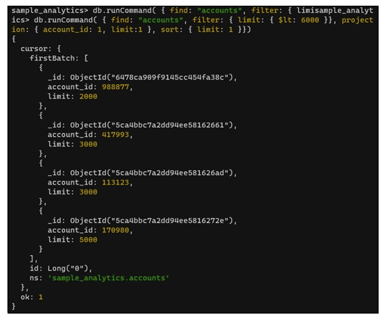
Người dùng muốn:
- chỉ hiển thị account_id và limit
- sắp xếp kết quả theo limit
Truy vấn:
db.runCommand({
 find: "accounts",
 filter: { limit: { $lt: 6000 } },
 projection: { account_id: 1, limit: 1 },
 sort: { limit: 1 }
})
Kết quả trả về là cursor chứa các document thỏa điều kiện.
5.4.3 Lệnh findAndModify
Lệnh findAndModify:
- lọc document
- sửa document
- trả về một document duy nhất
Document trả về có thể:
- là document trước khi sửa
- hoặc sau khi sửa
Cú pháp
db.runCommand({
 findAndModify: <collection-name>,
 query: <document>,
 sort: <document>,
 remove: <boolean>,
 update: <document hoặc aggregation pipeline>,
 new: <boolean>,
 fields: <document>,
 upsert: <boolean>,
 bypassDocumentValidation: <boolean>,
 writeConcern: <document>,
 collation: <document>,
 arrayFilters: <array>,
 hint: <document|string>,
 comment: <any>,
 let: <document> // MongoDB 5.0
})
| Parameter | Type | Description |
|---|---|---|
| findAndModify | string | Tên collection |
| query | document | Điều kiện chọn document |
| sort | document | Chỉ định document đầu tiên trong kết quả đã sort |
| remove | boolean | Nếu true → xóa document |
| update | document/array | Nội dung update |
| new | boolean | Nếu true → trả về document sau khi update |
| fields | document | Các field cần trả về |
| writeConcern | document | Mức độ đảm bảo ghi |
| collation | document | Quy tắc so sánh chuỗi |
Lưu ý
Mặc định lệnh này trả về document trước khi sửa.
Nếu muốn trả về document sau khi sửa phải đặt:
new: true
Ví dụ
Từ collection accounts trong database sample_analytics.
Người dùng muốn:
- tìm document có
limit = 2000 - cập nhật thành 2500
- hiển thị document sau khi sửa
Truy vấn:
db.runCommand({
 findAndModify: "accounts",
 query: { limit: 2000 },
 update: { $set: { limit: 2500 } },
 new: true
})
Kết quả:
{
 account_id: 988877,
 limit: 2500,
 products: ["InvestmentFund"]
}
Lưu ý
Nếu không có document nào khớp điều kiện, giá trị trả về sẽ là:
value: null
5.4.4 Lệnh update
Lệnh update dùng để:
- sửa một hoặc nhiều document trong collection
Một lệnh update có thể chứa:
- một update statement
- hoặc nhiều update statements
Cú pháp
db.runCommand({
 update: <collection>,
 updates: [
  {
   q: <query>,
   u: <document hoặc pipeline>,
   c: <document>, // MongoDB 5.0
   upsert: <boolean>,
   multi: <boolean>,
   collation: <document>,
   arrayFilters: <array>,
   hint: <document|string>
  }
 ],
 ordered: <boolean>,
 writeConcern: { <write concern> },
 bypassDocumentValidation: <boolean>,
 comment: <any>,
 let: <document> // MongoDB 5.0
})| Parameter | Type | Description |
|---|---|---|
| update | string | Tên collection |
| updates | array | Danh sách update statements |
| ordered | boolean | Nếu true → khi lỗi thì các update sau không chạy |
| writeConcern | document | Mức độ đảm bảo ghi |
| bypassDocumentValidation | boolean | Cho phép update document không hợp lệ |
| comment | any | Chuỗi mô tả operation |
| Field | Type | Description |
|---|---|---|
| q | document | Điều kiện query |
| u | document/array | Nội dung update |
Ví dụ
Collection accounts trong database sample_analytics
Một số document có:
limit = 3000
Truy vấn xem các document này:
db.accounts.find({ limit: 3000 })
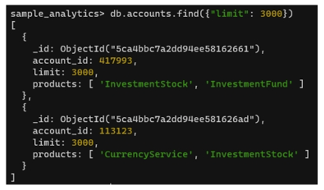
Cập nhật dữ liệu
Người dùng muốn:
limit = 3000 → 4000
Truy vấn:
db.runCommand({
 update: "accounts",
 updates: [
  {
   q: { limit: 3000 },
   u: { $inc: { limit: 1000 } },
   multi: true
  }
 ]
})

n: 2
modified: 2
ok: 1
Có 2 document được cập nhật.
Kiểm tra dữ liệu sau khi update
db.accounts.find({ limit: 4000 })
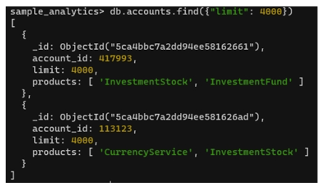
Hai document hiện có:
limit = 4000
Dưới đây là bản dịch sát nội dung các trang bạn gửi, có tham chiếu rõ phần nào từ hình (Figure / Table) như trong tài liệu.
5.4.5 Lệnh delete (delete Command)
Lệnh delete dùng để xóa một hoặc nhiều document khỏi một collection.
Một lệnh delete có thể chứa nhiều specification xóa.
Cú pháp của lệnh delete
db.runCommand(
{
  delete: <collection>,
  deletes: [
  {
    q: <query>,
    limit: <integer>,
    collation: <document>,
    hint: <document|string>
  },
  ...
  ],
  comment: <any>,
  let: <document>, // Added in MongoDB 5.0
  ordered: <boolean>,
  writeConcern: { <write concern> }
}
)
| Parameter | Type | Description |
|---|---|---|
| delete | string | Dùng để chỉ định tên collection mục tiêu mà document sẽ bị xóa |
| deletes | array | Dùng để cung cấp một mảng các lệnh delete trong lệnh delete command |
| ordered | boolean | Dùng để chỉ định liệu các lệnh còn lại có được thực thi khi một lệnh delete thất bại hay không. Nếu đặt true, các lệnh còn lại không được thực thi; nếu đặt false, các lệnh còn lại vẫn tiếp tục thực thi Optional; giá trị mặc định là true. |
| writeConcern | document | Dùng để chỉ định mức write concern cho thao tác ở mức transaction hoặc mức operation |
(Bảng tham số trong mảng deletes – Table 5.10)
| Field | Type | Description |
|---|---|---|
| q | document | Dùng để chỉ định điều kiện lựa chọn document bằng query selectors |
| limit | Non-negative integer | Dùng để xác định số document phù hợp sẽ bị xóa. Phải đặt 0 để xóa tất cả document phù hợp, và 1 để xóa một document phù hợp |
| collation | document | Dùng để chỉ định quy tắc collation cho thao tác, bao gồm các quy tắc ngôn ngữ cho so sánh chuỗi như chữ hoa/chữ thường và dấu |
deletes ArrayVí dụ minh họa
(phần ví dụ lấy từ Figure 5.14 và Figure 5.15)
Giả sử collection accounts trong database sample_analytics có các document với giá trị limit = 7000.
Để xem các document này, người dùng chạy query:
db.runCommand({
  find: "accounts",
  filter: { limit: { $eq: 7000 } },
  projection: { account_id: 1, limit: 1 }
})
Figure 5.14
Hình 5.14 hiển thị 5 document thỏa điều kiện truy vấn.
Xóa tất cả document có limit = 7000
Người dùng có thể chạy query:
db.runCommand({
  delete: "accounts",
  deletes: [
    { q: { limit: 7000 }, limit: 0 }
  ]
})
Trong truy vấn này:
limit = 0
vì tất cả document phù hợp phải bị xóa.
Figure 5.15
Hình 5.15 hiển thị kết quả của thao tác delete.
Kết quả trả về:
n: 5
ok: 1
Điều này nghĩa là 5 document đã bị xóa thành công.
5.5 Aggregation Commands
Các aggregation commands cho phép người dùng:
- gom nhóm dữ liệu từ nhiều document
- thực hiện các phép toán trên dữ liệu đã nhóm
- trả về một kết quả duy nhất
Để thực hiện aggregation, người dùng có thể sử dụng:
- aggregation pipeline
- hoặc single aggregation methods
Các phương thức aggregation của MongoDB
(Hình minh họa MongoDB Database Commands)
MongoDB cung cấp các phương thức aggregation sau:
1️⃣ count
Dùng để đếm số lượng document trong một collection
2️⃣ aggregate
Dùng để thực hiện các tác vụ aggregation trên document trong collection
3️⃣ distinct
Dùng để hiển thị các giá trị khác nhau (distinct values) trong collection
5.5.1 Lệnh count
Như tên gọi của nó, lệnh count dùng để đếm số lượng document trong một collection.
Lệnh này trả về một document chứa:
- giá trị đếm
- trạng thái của lệnh
Cú pháp lệnh count
(khối code nền xanh trong hình)
db.runCommand(
{
  count: <collection or view>,
  query: <document>,
  limit: <integer>,
  skip: <integer>,
  hint: <hint>,
  readConcern: <document>,
  collation: <document>,
  comment: <any>
}
)
Table 5.11: Parameters of the count Command
| Parameter | Type | Description |
|---|---|---|
| count | string | Dùng để chỉ định tên collection nơi thực hiện thao tác đếm |
| query | document | Dùng để chỉ định điều kiện lọc document cần đếm |
| limit | integer | Dùng để chỉ định số lượng document khớp tối đa được trả về |
| skip | integer | Dùng để chỉ định số document khớp cần bỏ qua trước khi trả kết quả |
| hint | string | Dùng để chỉ định index sẽ được sử dụng |
| readConcern | document | Dùng để chỉ định mức read concern của thao tác |
| collation | document | Dùng để chỉ định quy tắc collation cho thao tác (so sánh chuỗi theo ngôn ngữ, chữ hoa/thường, dấu, v.v.) |
Ví dụ
Xét collection accounts trong database sample_analytics.
Để đếm số document có limit ≤ 4000, người dùng chạy:
db.runCommand({
  count: "accounts",
  query: { limit: { $lte: 4000 } }
})
Figure 5.16
Hình 5.16 hiển thị kết quả của truy vấn.
Kết quả:
n: 3
ok: 1
Điều này nghĩa là có 3 document thỏa điều kiện truy vấn.
5.5.2 Lệnh aggregate
Lệnh aggregate thực hiện aggregation operation bằng aggregation pipeline.
Bài tập
Phần 1 — Tạo cơ sở dữ liệu và chèn dữ liệu (3 điểm)
Yêu cầu:
Tạo cơ sở dữ liệu:
companyDB
Tạo collection:
employees
Chèn các document sau:
{
  employee_id: 1,
  name: "An",
  age: 25,
  department: "Kỹ thuật",
  scores: [8, 9, 7],
  skills: ["MongoDB", "NodeJS", "Docker"]
}
{
  employee_id: 2,
  name: "Bình",
  age: 27,
  department: "Marketing",
  scores: [6, 7, 8],
  skills: ["SEO", "Content"]
}
{
  employee_id: 3,
  name: "Chi",
  age: 24,
  department: "Kỹ thuật",
  scores: [9, 9, 10],
  skills: ["MongoDB", "Python", "Docker"]
}
{
  employee_id: 4,
  name: "Dũng",
  age: 26,
  department: "Nhân sự",
  scores: [7, 6, 8],
  skills: ["Recruitment", "Training"]
}
{
  employee_id: 5,
  name: "Hà",
  age: 28,
  department: "Kỹ thuật",
  scores: [8, 8, 9],
  skills: ["Python", "Cloud"]
}
Thang điểm:
| Nội dung | Điểm |
|---|---|
| Tạo database và collection đúng | 1 |
| Chèn đúng dữ liệu | 2 |
Phần 2 — Truy vấn dữ liệu cơ bản (4 điểm)
Câu 1 (1 điểm)
Tìm các nhân viên thuộc phòng ban:
"Kỹ thuật"
Câu 2 (1 điểm)
Tìm các nhân viên có tuổi nhỏ hơn 27.
Câu 3 (1 điểm)
Tìm các nhân viên có kỹ năng:
"MongoDB"
Câu 4 (1 điểm)
Chỉ hiển thị các trường sau:
-
name -
department -
skills
Phần 3 — Truy vấn với mảng (4 điểm)
Câu 1 (1.5 điểm)
Tìm các nhân viên có ít nhất một điểm số lớn hơn hoặc bằng 9 trong mảng scores.
Câu 2 (1.5 điểm)
Tìm các nhân viên có ít nhất 3 kỹ năng.
Câu 3 (1 điểm)
Sắp xếp danh sách nhân viên theo tuổi theo thứ tự giảm dần.
Phần 4 — Cập nhật và xóa dữ liệu (3 điểm)
Câu 1 (1.5 điểm)
Thêm kỹ năng:
"Git"
vào nhân viên có:
employee_id = 1
Câu 2 (1.5 điểm)
Xóa nhân viên có:
employee_id = 4
Phần 5 — Aggregation Pipeline (4 điểm)
Yêu cầu:
Thống kê số lượng nhân viên phòng Kỹ thuật theo từng kỹ năng.
Pipeline phải thực hiện các bước sau:
-
Tách mảng
skills -
Lọc các nhân viên có
department = "Kỹ thuật" -
Đếm số lượng nhân viên theo từng kỹ năng
-
Sắp xếp kết quả theo thứ tự giảm dần
-
Hiển thị kết quả theo dạng:
skill
total_employees
Kết quả mẫu:
MongoDB  -> 2
Python   -> 2
Docker   -> 2
Cloud    -> 1
NodeJS   -> 1
Thang điểm:
| Thành phần | Điểm |
|---|---|
$unwind |
1 |
$match |
0.5 |
$group |
1 |
$sort |
0.5 |
$project |
1 |
| Tổng | 4 |
Phần 6 — Index (1 điểm)
Tạo index cho trường:
department
Phần 7 — Transaction (1 điểm)
Thực hiện transaction với các yêu cầu sau:
-
Tăng tuổi của nhân viên có
employee_id = 1lên 1 -
Tăng tuổi của nhân viên có
employee_id = 2lên 1
Sau đó commit transaction.
Bài tập nâng cao:
Part 1 — Create Database and Insert Data (3 points)
Create database:
enterpriseDB
Create collections:
employees
projects
Insert into employees
{
  employee_id: 1,
  name: "Khanh",
  age: 27,
  department: "IT",
  skills: ["MongoDB", "NodeJS", "Docker"],
  project_ids: [1,2]
}

{
  employee_id: 2,
  name: "Linh",
  age: 30,
  department: "Marketing",
  skills: ["SEO", "Content"],
  project_ids: [3]
}

{
  employee_id: 3,
  name: "Phong",
  age: 26,
  department: "IT",
  skills: ["MongoDB", "Python", "AI"],
  project_ids: [1,4]
}

{
  employee_id: 4,
  name: "Trang",
  age: 28,
  department: "Finance",
  skills: ["Excel", "Accounting"],
  project_ids: [5]
}

{
  employee_id: 5,
  name: "Hieu",
  age: 29,
  department: "IT",
  skills: ["Cloud", "Security", "Docker"],
  project_ids: [2,4]
}
Insert into projects
{
  project_id: 1,
  name: "ERP",
  budget: 5000,
  status: "active"
}

{
  project_id: 2,
  name: "CRM",
  budget: 3000,
  status: "active"
}

{
  project_id: 3,
  name: "Marketing Campaign",
  budget: 2000,
  status: "completed"
}

{
  project_id: 4,
  name: "AI System",
  budget: 6000,
  status: "active"
}

{
  project_id: 5,
  name: "Audit System",
  budget: 2500,
  status: "completed"
}
Part 2 — Advanced Queries (5 points)
Question 1 (1 point)
Find employees:
-
department =
"IT" -
age ≤ 28
Question 2 (1 point)
Find employees who have both skills:
-
"MongoDB" -
"AI"
Question 3 (1 point)
Find employees who have at least 2 projects
Question 4 (1 point)
Find employees whose skills include either:
-
"Docker"OR"Cloud"
Question 5 (1 point)
Display only:
-
name -
department -
project_ids
Do not show _id
Part 3 — Join & Array Queries (4 points)
Question 1 (2 points)
Using $lookup, display:
-
employee name
-
project names they are working on
Question 2 (1 point)
Find employees who are working on project:
"AI System"
Question 3 (1 point)
Sort employees by:
-
number of projects (descending)
Part 4 — Update and Delete (3 points)
Question 1 (1.5 points)
Add skill:
"Kubernetes"
to all employees in department "IT"
Question 2 (1.5 points)
Remove all employees who:
-
have no
"MongoDB"skill
Part 5 — Aggregation Pipeline (4 points)
Generate report:
👉 Total budget of projects per department
Requirements
-
$lookupemployees ↔ projects -
$unwindprojects -
$groupby department -
calculate:
-
total_budget
-
average_budget
-
-
$sortby total_budget descending
Output format
department
total_budget
average_budget
Example output
IT → total: 14000 → avg: 4666
Marketing → total: 2000 → avg: 2000
Finance → total: 2500 → avg: 2500
Part 6 — Index (1 point)
Create compound index:
department + age
Part 7 — Transaction (1 point)
Within a transaction:
-
Increase age of employee_id = 1 by 1
-
Increase age of employee_id = 3 by 1
-
Add project_id = 4 to employee_id = 5
Then commit
Bài 3:
Part 1 — Create Database and Insert Data (3 points)
Create database:
companyDB
Create collections:
-
staff -
tasks
Insert into staff
{
  staff_id: 1,
  name: "An",
  age: 25,
  department: "Engineering",
  skills: ["MongoDB", "JavaScript", "Git"],
  task_ids: [1, 2]
}
{
  staff_id: 2,
  name: "Binh",
  age: 31,
  department: "Sales",
  skills: ["Communication", "CRM"],
  task_ids: [3]
}
{
  staff_id: 3,
  name: "Chi",
  age: 27,
  department: "Engineering",
  skills: ["Python", "AI", "MongoDB"],
  task_ids: [1, 4]
}
{
  staff_id: 4,
  name: "Dung",
  age: 29,
  department: "HR",
  skills: ["Recruitment", "Excel"],
  task_ids: [5]
}
{
  staff_id: 5,
  name: "Em",
  age: 28,
  department: "Engineering",
  skills: ["Cloud", "Docker", "Linux"],
  task_ids: [2, 4]
}
Insert into tasks
{
  task_id: 1,
  name: "Internal Portal",
  budget: 4000,
  status: "active"
}
{
  task_id: 2,
  name: "Deployment System",
  budget: 3500,
  status: "active"
}
{
  task_id: 3,
  name: "Sales Dashboard",
  budget: 2500,
  status: "completed"
}
{
  task_id: 4,
  name: "AI Assistant",
  budget: 5500,
  status: "active"
}
{
  task_id: 5,
  name: "Hiring Tracker",
  budget: 2000,
  status: "completed"
}
Part 2 — Advanced Queries (5 points)
Question 1 (1 point)
Find staff:
-
department = "Engineering" -
age < 29
Question 2 (1 point)
Find staff who have both skills:
-
"MongoDB" -
"Python"
Question 3 (1 point)
Find staff who have at least 2 tasks
Question 4 (1 point)
Find staff whose skills include either:
-
"Docker"OR"Cloud"
Question 5 (1 point)
Display only:
-
name -
department -
task_ids
Do not show _id
Part 3 — Join & Array Queries (4 points)
Question 1 (2 points)
Using $lookup, display:
-
staff name
-
task names they are assigned to
Question 2 (1 point)
Find staff who are working on task:
-
"AI Assistant"
Question 3 (1 point)
Sort staff by:
-
number of tasks (descending)
Part 4 — Update and Delete (3 points)
Question 1 (1.5 points)
Add skill:
-
"Kubernetes"
to all staff in department "Engineering"
Question 2 (1.5 points)
Remove all staff who:
-
do not have skill
"MongoDB"
Part 5 — Aggregation Pipeline (4 points)
Generate report:
👉 Total budget of tasks per department
Requirements
-
$lookupstaff ↔ tasks -
$unwindtasks -
$groupbydepartment -
calculate:
-
total_budget -
average_budget
-
-
$sortbytotal_budgetdescending
Output format
-
department -
total_budget -
average_budget
Example output
Engineering → total: 13000 → avg: 4333
Sales → total: 2500 → avg: 2500
HR → total: 2000 → avg: 2000
Part 6 — Index (1 point)
Create compound index:
-
department + age
Part 7 — Transaction (1 point)
Within a transaction:
-
Increase age of
staff_id = 1by 1 -
Increase age of
staff_id = 3by 1 -
Add
task_id = 4tostaff_id = 5 -
Then commit
Bài viết liên quan:


Dịch vụ thiết kế Wesbite